๐Ÿ“œ Open Source License
SheetQuiz Editor includes the following open source libraries, please refer to the links for their respective license details.

- ExcelJS
License: MIT
Open Details

- FileSaver.js
License: MIT
Open Details

- Bootstrap 4.6.2
License: MIT
Open Details

- jQuery 3.7.1
License: MIT
Open Details

- Popper.js 1.16.0
License: MIT
Open Details

- MathJax
License: Apache License, Version 2.0
Open Details

- CodeMirror 5
License: MIT
Open Details
Formula Editor
$@\alpha@$ $@\beta@$ $@\gamma@$ $@\delta@$ $@\epsilon@$ $@\zeta@$ $@\eta@$ $@\theta@$ $@\iota@$ $@\kappa@$ $@\lambda@$ $@\mu@$ $@\nu@$ $@\xi@$ $@\omicron@$ $@\pi@$ $@\rho@$ $@\sigma@$ $@\tau@$ $@\upsilon@$ $@\phi@$ $@\chi@$ $@\psi@$ $@\omega@$
$@\Gamma@$ $@\Delta@$ $@\Theta@$ $@\Lambda@$ $@\Xi@$ $@\Pi@$ $@\Sigma@$ $@\Upsilon@$ $@\Phi@$ $@\Psi@$ $@\Omega@$
$@\frac{b}{a}@$ $@\sqrt{a}@$
$@x^{n}@$ $@x_{n}@$
$@\vec{A}@$ $@\bar{A}@$ $@\hat{i}@$
$@\angle@$ $@\circ@$
$@\emptyset@$ $@\cup@$ $@\cap@$ $@\in@$ $@\notin@$ $@\subset@$ $@\supset@$ $@\subseteq@$ $@\supseteq@$
$@\sum@$ $@\prod@$
$@\int@$ $@\lim_{x\to\infty}@$ $@\log_{a}{b}@$
$@\infty@$
$@\to@$ $@\leftarrow@$ $@\iff@$ $@\implies@$
$@\begin{matrix}a & b \\ c & d\end{matrix}@$ $@\begin{pmatrix}a & b \\ c & d\end{pmatrix}@$ $@\begin{bmatrix}a & b \\ c & d\end{bmatrix}@$ $@\begin{Bmatrix}a & b \\ c & d\end{Bmatrix}@$ \begin{array}{|l|l|} \hline \textbf{A} & \textbf{B} \\ \hline \rm{text1-1} & \rm{text1-2} \\ \hline \end{array}
$@\lt@$ $@\gt@$ $@\leq@$ $@\geq@$ = โ‰ 
+ โˆ’ ร— รท
Gap $@\textrm{Serif}@$ $@\textit{Italic}@$ $@\textbf{Bold}@$ $@\underline{Underline}@$ $@\texttt{Code}@$ $@\mathbb{Text}@$ $@\mathfrak{Text}@$ $@\mathcal{Text}@$

โ„น๏ธ To insert a formula between letters, enter it between $@ and @$, and to display it in block form, enter it between $$@ and @$$.
Insert image (Legacy)
Preview

โ„น๏ธ The image code must be pasted at the end after entering all the questions.
Convert the image to text and then enter it after the question. Images cannot be inserted into the explanation.
๐Ÿ’ผ Software Information
SheetQuiz Editor For SheetQuiz 5.0
By Blackcats4567
Made in Korea

Unauthorized reproduction of this software is prohibited.

Terms Of Use | Privacy Policy
๐Ÿ”‘ SheetQuiz Account
Terms Of Use | Privacy Policy
SheetQuiz Editor 4.9
๐Ÿ“ Create New Options


๐Ÿ“ Create with AI

ChatGPT

โ€ป ChatGPT is a trademark of OpenAI. It is provided by OpenAI, and SheetQuiz has created a GPTs for SheetQuiz. This is not an affiliation.


โ„น๏ธ TIP
For Vocabulary Quizzes, separate multiple answers with commas.
Please ignore this if you are creating Flashcards or Terminology quizzes.
To ignore parentheses during answer grading, enable [Relax subjective grading].
๐Ÿ”„ Quiz Duplicate
Before remixing, check if the quiz is copyrighted.
For private quizzes, only the quiz owner can use the duplicate function.


โ˜๏ธ Cloud Edit Mode
Be sure to Save (Ctrl+S) for changes to be saved and applied!!
โ˜๏ธ Upload to Explore

Before uploading, check your cloud limit. View Limits

๐Ÿ“ Create a new quiz from scratch


Before creating, check your cloud limit. View Limits
New quizzes are created as private and can be accessed by anyone with the link

Loading...


Due to your browser's security policy, automatic redirection to My Page is not possible.
Please click the link below to manually go to your My Page.

Go to My Page
โŒ Exit Editor

Are you sure you want to exit the SheetQuiz Editor? Unsaved changes will be lost.

๐Ÿ  Return to SheetQuiz Main Cancel
โŒ Error

Failed to load the quiz file.
Insufficient access permissions or the file is corrupted.

Login Try Again
๐Ÿ  Return to SheetQuiz Main
Help

Test type

SheetQuiz supports two types of test papers, and the differences are as shown in the table below.

QUIZ FROM SHEET DIRECT CREATION
Create by entering the question and answer into the sheet

Appropriate choice in most situations, such as vocabulary tests

Flashcards and quizzes are automatically generated
Create by entering all information about the question, including the question, answer, question type (such as multiple choice), and multiple choice options.

Suitable options for creating true/false quizzes, test papers with pictures, and test papers with different types of questions

Before creating, you must identify the characteristics of the learning materials you want to produce and select the most appropriate test type.

Help

Relax subjective grading

SheetQuiz provides a relaxed subjective grading criteria function for English, Korean, Chinese (Traditional), and Japanese. When enabled, subjective questions are graded without case distinction, even if the entered answer is slightly different, if the meaning is the same, it is treated as correct, and parentheses in the correct answer are ignored.
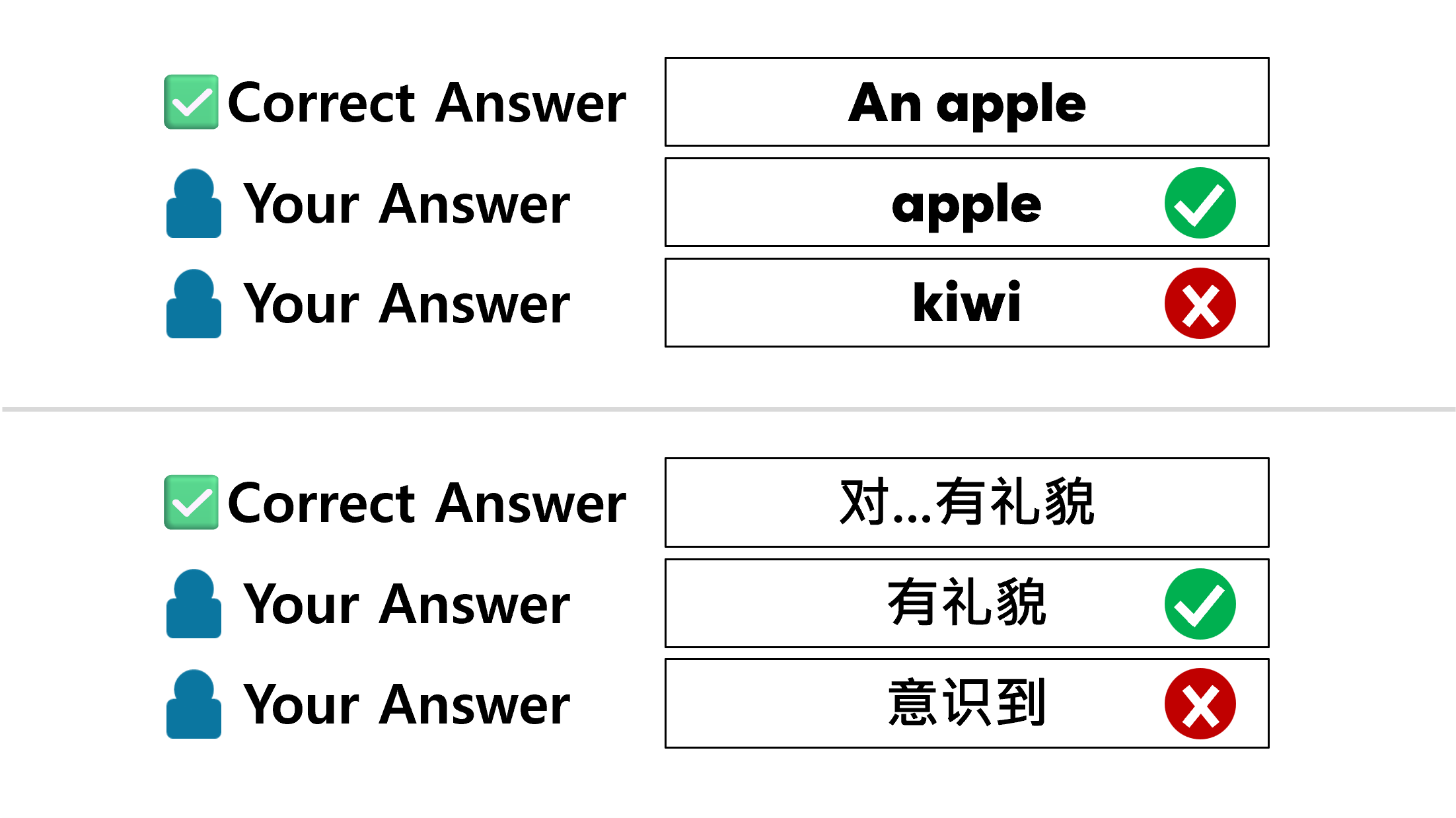

Help

Hide answers and explanations

This setting determines whether the [Answer] and [Explanation] buttons are displayed on the test results screen. If this setting is enabled, the buttons to view the answers and explanations will disappear after grading.

Help

Allow tests only

If you enable this setting, the button to learn with flashcards (Start with Cards) will disappear when you open a file.

Help

Show first correct answer only on flashcards

If there are too many correct answers to interfere with flashcard learning(ex: some Japanese tests), you can set the flashcard to display only one correct answer.

Help

Custom Test Question Formats

โ„น๏ธ TIP: If you need to create multiple questions of the same type, use the [Dup] button!
  • Multiple Choice (Single Answer): Defines a multiple-choice question where only one option can be selected as the correct answer.

  • Multiple Choice (Multiple Answers): Defines a multiple-choice question where multiple options can be selected as correct answers.

  • Subjective: Defines a question that accepts a single-line answer from the user. You can define multiple correct answers.

    โš ๏ธ Check whether the "Relax subjective grading" setting is on or off.
    โ„น๏ธ For short answer questions, if you enter only a comma (,) as the answer, any response from the user will be marked as correct.
  • Descriptive: Defines a question that accepts a multi-line answer from the user. You can only define one correct answer, which may include commas (,).

  • True/False (O/X) Quiz: Defines a question where the choices are O or X.

Help

Bookmarks

You can define a screen that allows the user to select the scope of the problem for this file.

  • Disable: The list is not loaded even if the file contains bookmark information.

  • Enable: Allows bookmarks to be loaded into the bookmarks list.

  • Enable & Auto pop-up: When the file is opened, a pop-up will open immediately to allow the user to select a bookmark, even if the user does not press the [Set the Range] button. However, in this case, the pop-up will be executed as โœด๏ธ Select Options.

Markdown Help
Syntax Preview
**Bold** Bold
~~Strikethrough~~ Strikethrough
__Underline__ Underline
##Header 1##

Header 1

###Header 2###

Header 2

`Code` Code
```Code Block```
Code Block
$@E=mc^{2}@$ $@E=mc^{2}@$
$$@E=mc^{2}@$$ $$@E=mc^{2}@$$
LOGOEditor
  • File
    โœ๏ธ New File (Ctrl+Q) ๐Ÿ“‚ Open from Computer (Ctrl+O) โ˜๏ธ Save to cloud storage ๐Ÿ“ฅ Download Project (Ctrl+D)
    โŒ Close Editor
  •  
     
  • Others
    ๐Ÿ”’ Manage SheetQuiz account ๐Ÿ” Edit an uploaded quiz file
    TEST SheetQuiz Offline Testing
    ๐Ÿ“œ Open Source License ๐Ÿ’ผ Software Information
  • Help
    ๐Ÿง‘โ€๐ŸŽ“ Student Guide ๐Ÿ“… Creating a 'Quiz from Sheet' Quiz ๐Ÿช„ Creating a 'Direct Creation' Quiz ๐Ÿ“Š Collecting and Sharing Results ๐Ÿค– Creating Quizzes with AI โš™๏ธ SheetQuiz Other Help
    SheetQuiz Help Center
  • AI
    โœจ Create a new quiz with ChatGPT

    โ€ป ChatGPT is a trademark of OpenAI, and SheetQuiz has created its own GPTs for SheetQuiz. You can create a complete quiz file for SheetQuiz by uploading any material!


SheetQuiz Editor

Create Quiz


Select a quiz to edit from My Account


Help

New to SheetQuiz?
We'll show you how to start creating quizzes.
Want to know how to create a quiz by copying and pasting a table? Want to create it like making a quiz on a questionnaire? Want to create high-quality quizzes with AI?


  • Info
    ๐Ÿ“œ Open Source License ๐Ÿ’ผ Software Information